
Contents 6 sections
If I were planning next year's PC refresh, I would put away the list sorted by device age and sort the fleet by what people do all day. A refresh by age replaces laptops that still fit the work and misses the ones that hold somebody back.
At Ignite on 17 November 2026 Microsoft said much the same. Its Windows post tells IT to "Plan your refresh by role, with Copilot+ PCs and Windows 365 in one plan". This article is for the IT and finance leads who have to turn that sentence into a budget: which device each group gets, which new security features to switch on, and where the money comes back.
The order I would do it in
1. List the fleet and group it by what people do
Start with a list from Intune: serial number, product name, operating system version, total physical memory, free storage, enrolled date, last check-in and primary user. The enrolled date is not the purchase date, so add that from finance, plus twelve months of support tickets by serial number.
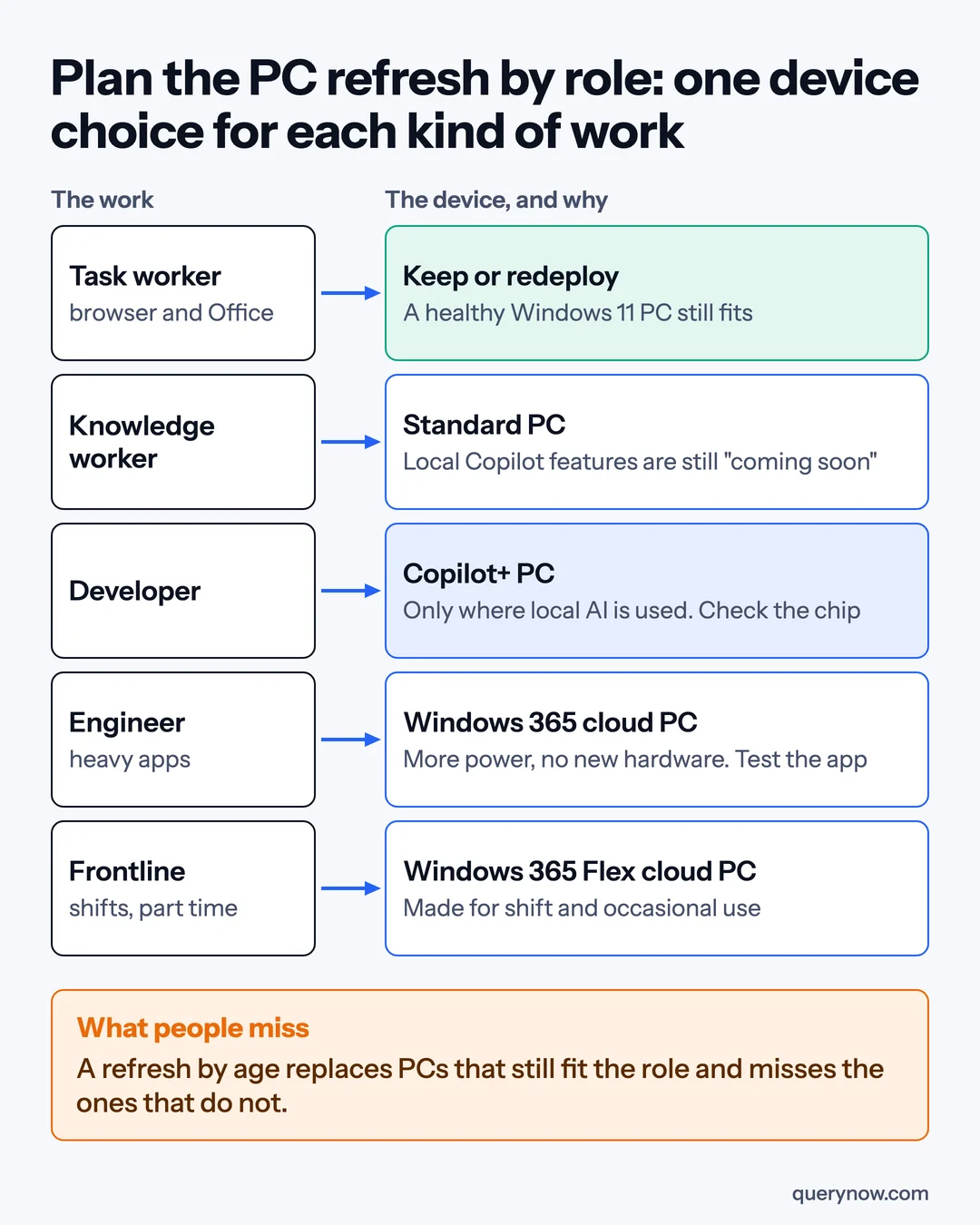
Then group the devices. I would start with five: task workers in a browser and Office, knowledge workers, developers, engineers with heavy applications, and frontline staff on shifts. Ask each department head which applications the group cannot work without, because job titles will not say.
2. Pick one of four answers for each group
The answers are keep or redeploy, a standard PC, a Copilot+ PC, or a Windows 365 cloud PC, a Windows desktop that runs in Microsoft's cloud for a monthly fee. Keep or redeploy first, where the device runs Windows 11 and passes the user test in the table below. Each answer is a shortlist until the costs are compared.
I would buy a Copilot+ PC only where local AI is part of the job today. Microsoft's post names it as the device for knowledge work, yet says local context, actions and models for Copilot are "coming soon" to Copilot+ PCs, with no date. I would not pay more for a whole department on features that have not shipped.
Developers are a separate case. GitHub Copilot can now send coding work to local models, in preview, on developer PCs with specific NVIDIA and AMD chips. A Copilot+ label alone does not tell you a machine qualifies, so pilot on the named hardware before you order.
For shift and part-time staff, look at Windows 365 Flex, the plan called Windows 365 Frontline until May 2026. For engineers, test the heaviest application, the site network and any attached equipment on a cloud PC first, and buy a workstation if one fails. A cloud PC still needs a device to connect from, and a Windows 10 PC that connects to one gets the paid Windows 10 security updates at no extra cost for up to three years while the subscription is active.
3. Check your security vendor
The Windows endpoint security platform is generally available. It lets security vendors move critical protections out of the kernel, the core of Windows where one fault can stop the whole PC. Microsoft names seven vendors that have built on it.
That does not tell you what the version on your PCs does, so ask yours in writing which protections have moved and in which version. Steps 3 and 4 can run alongside the buying.
4. Pilot administrator protection with IT first
Windows administrator protection is generally available. Local administrators work with standard rights, and Windows Hello confirms the person each time a task needs admin rights, so the pilot group needs Windows Hello. Start with the IT team, who run the old installers and scripts I would expect to break. List what broke, and widen the pilot when each item passes a retest.
5. Leave agent containers for later
Microsoft Execution Containers keep an AI agent inside limits on which files and networks it can reach. Microsoft says they have been generally available on Windows 11 since October, with new process containers in preview and the learning modes, which let IT watch an agent before enforcing rules, generally available. With no agents on your PCs, this can wait.
So can Windows 365 for Agents, cloud PCs that agents use to click through applications. It is now billable in Copilot Credits. The Windows 365 post has the detail.
Where the money comes back
The return has three sources: devices you do not replace because they still fit, the higher-priced class bought only for groups that use what it adds, and Windows 10 update fees you stop paying. The first is spending moved to a later year. The other two are avoided costs, less what the change itself costs.
Paid security updates for business devices on Windows 10, which Microsoft calls Extended Security Updates, did not change at Ignite. Microsoft's page lists $61 per device for year one, which started in November 2025, doubling each year for at most three years. That is $427 per device across all three, and a device that joins in year two pays for year one too. Only years not yet bought count as a saving.
For each group, count device cost by class, the remaining update fee per Windows 10 device, and tickets per device multiplied by what a ticket costs you to handle. A cloud PC is a monthly cost and a laptop is a purchase, so compare both with keeping the current device over the same years, counting the device the cloud PC is reached from.
Count what redeployed devices cost to prepare. I would skip any business case built on hours saved by local AI until those features ship and you can measure them.
How I would check it was done
| Check | How to prove it |
|---|---|
| The chosen device does the group's work | Two users finished their usual tasks with no application, network or equipment failure |
| Higher-priced PCs went only to roles that use local AI | The order list matched to groups, with the feature each uses |
| No Windows 10 device pays for updates without a leave date | The update licence count matched to a list of devices and dates |
| You know what your security product moved out of the kernel | The vendor's written answer and the version on a sample of PCs |
One caveat. The local Copilot features that would justify a Copilot+ PC for office staff are not available yet, and process containers and local coding models are in preview, so review this in six months. Device and cloud PC prices are left out because they depend on your contracts.
If you sorted your fleet by role tomorrow, how many of the devices on next year's replacement list would still be on it?
Where QueryNow fits
QueryNow's PC refresh assessment takes your Intune data, groups the fleet by role and returns a table of which device each group should get and what it costs.
Sources
- Windows Experience Blog, Microsoft Ignite 2026: Building Windows for the next era of work, 17 November 2026
- Microsoft Tech Community, Windows 365 at Ignite 2026: Introducing new Cloud PC capabilities for people, agents and IT, 17 November 2026
- Microsoft Learn, Extended Security Updates (ESU) program for Windows 10, 10 November 2026
- Microsoft Learn, View device details in Microsoft Intune, 28 September 2026
- Microsoft, Ignite 2026 Book of News, 17 November 2026
QueryNow leads AI transformation for enterprises in the US and Europe. Founded in Germany in 2014, we build the foundation enterprise AI runs on, and the agents that run on it, for pharma, healthcare, manufacturing and financial services organizations on Azure and AWS.
FAQ
Frequently asked questions
Should every employee get a Copilot+ PC in the next refresh?
I would not buy one for every employee. At Ignite on 17 November 2026 Microsoft said local context, local actions and local models for Copilot are coming soon to Copilot+ PCs, with no date. Buy it only for roles that use local AI today, and review the rest when the features ship. Local coding models for developers are in preview on specific NVIDIA and AMD hardware that Microsoft names, so pilot on that hardware before ordering.
What do Windows 10 Extended Security Updates cost a business?
Microsoft lists $61 per device for year one, which started in November 2025. The price doubles each year for at most three years, so year two is $122 and year three is $244, or $427 per device across all three. The program is cumulative, so a device that joins in year two also pays for year one.
What is Windows administrator protection?
It is a Windows feature that became generally available at Ignite 2026. Local administrators work with standard user rights by default, and when a task needs admin rights Windows Hello confirms the person and grants the rights to that task alone. I would pilot it with the IT team first, because they run the old installers and scripts most likely to behave differently.
When does a Windows 365 cloud PC make more sense than a new laptop?
I would shortlist it for shift and part-time staff, contractors, and people who need more computing power, then require their applications, site network and attached equipment to pass a pilot. A cloud PC is a monthly cost and still needs a device to connect from, so compare it with a laptop over the same number of years. Microsoft says a Windows 10 PC that connects to a Windows 365 cloud PC gets Extended Security Updates at no extra cost for up to three years while the subscription is active.
The Monday digest
The three posts worth your time each week, one paragraph each. From the people building production AI.