
Contents 6 sections
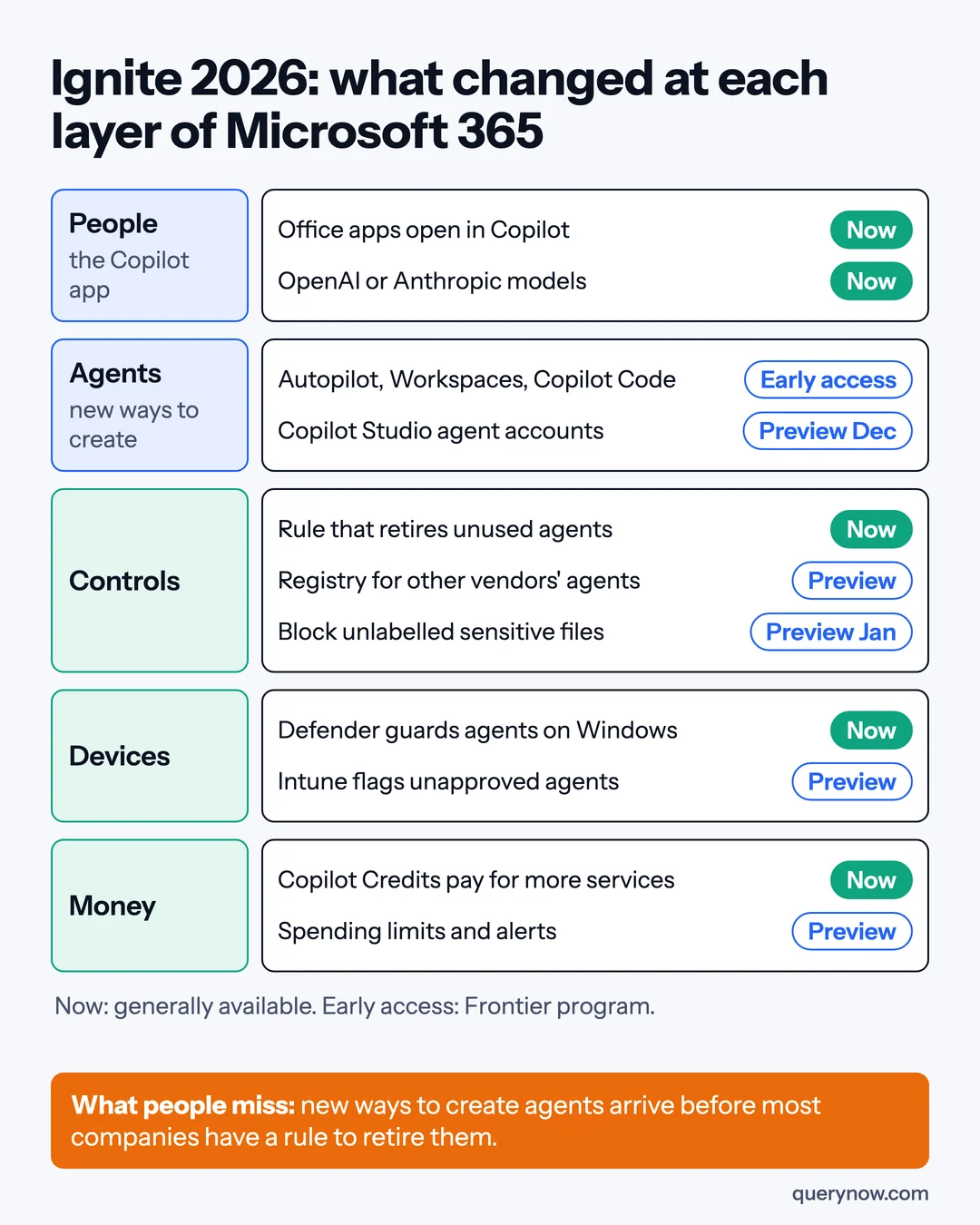
After this week's Ignite announcements, I would switch on the rule that retires unused agents before I let anyone try the new ways to create them. Microsoft announced several new ways for an employee to start an agent or build an app, and one gives each person a long-running agent with its own identity in your directory. The retirement rule is generally available, while most of the creation tools are still limited to early-access tenants.
Ignite runs from 17 to 20 November 2026, and the full list is in the Book of News. This article is for IT, finance and security leaders at companies of 200 to 5,000 people on Microsoft 365. It covers six decisions for this quarter, the order I would take them in, and how to tell whether the money comes back.
The order I would do it in
A baseline and named sponsors come first, because retirement notices need someone to answer them. Then check the generally available model and Windows controls, before piloting creation tools still in early access.
1. Take a baseline this week
Write down three numbers: people who used Copilot in the last 28 days against the seats you pay for, agents in the tenant and how many have a named owner, and last month's spend on Copilot Credits, Microsoft's unit for usage-based billing. Agent usage insights are generally available and no longer need an Agent 365 license. Then pick two tasks, one in finance and one in sales or service, and time them as they are done today.
2. Turn on the rule that retires agents
Lifecycle policies for agents in Microsoft Entra are generally available. They check whether each agent has a human sponsor and has been active recently, then send a notice and later disable or delete it. The built-in policy disables agent identities that have been inactive for 60 days.
An agent with no named person has nobody to answer the notice, so assign sponsors first. An agent that runs once a quarter looks inactive at 60 days, so list those first and decide how the policy should treat them. I would choose disable over delete until the policy has run for a quarter.
3. Set the allowed model vendors
Home and Office in Copilot are generally available. Word, Excel and PowerPoint open inside the Copilot app, and people can choose models from OpenAI or Anthropic. Microsoft's Copilot post says model access is governed by organizational policies. Allowing one vendor is a fair choice if the reason is written down, such as approved data handling, and the tenant setting matches the AI policy.
4. Cover the agents on laptops
Defender runtime protection for local agents is generally available on Windows. It blocks malicious instructions in coding agents such as Claude Code and GitHub Copilot CLI, and it needs Defender for Endpoint P2. I would run its Audit mode on developer machines for two weeks before switching to Block. Intune has a public preview that marks Windows devices running unapproved agents as noncompliant.
5. Decide who may create agents before the tools arrive
Autopilot is a long-running personal agent with its own identity, which Microsoft calls an Entra Agent ID. It is rolling out to Frontier program customers, as is Copilot Workspaces, which replaces Copilot Notebooks. Copilot Code, which builds apps from plain language, is in Frontier with general availability planned for December 2026. Copilot Studio agent accounts are due in public preview in December.
For each one I would write down the pilot group, the data its agents may reach, and the date the pilot is reviewed. Microsoft says colleagues will be able to @mention a person's Autopilot in Teams. I would test whether a colleague with less access can obtain restricted information through that mention.
6. Re-plan the labelling work, without stopping it
Microsoft Purview will add a data loss prevention control that stops Copilot using a sensitive file even when nobody has labelled it, based on the type of information inside. It enters preview in January 2027. Labels you need for other reasons stay on the plan. The work that may shrink is labelling done only to keep Copilot away from files, and I would keep it until tests cover the sensitive file types we use and the control is generally available.
Where the return comes from
Microsoft 365 Copilot lists at $30 per user per month paid yearly. At 1,000 seats that is $360,000 a year of cost. For this pilot the return is time taken out of the two tasks. Time them again after 28 days, then multiply minutes saved per run by runs per month, after rework, training and administration.
Set the rule before the pilot starts. Expand only where those hours, valued at staff cost, exceed the group's seat and credits cost, and otherwise change how the task is done or stop. Count cash savings only where spending falls, and report extra capacity separately.
The second place to look is usage-based spend. Copilot Credits now also pay for Windows 365 for Agents, so the bill can grow without a new purchase order. Agent 365 Cost Management is in preview and offers spending policies, limits and alerts. I would give the credits budget one owner, check which services a limit covers, and test that it stops spending.
Agent 365 Business Analytics, rolling out to Frontier, reports assisted hours by job and task. Treat them as an estimate until they agree with your own timings.
What I would skip this quarter is buying Agent 365, at a list price of $15 per user per month, only to register agents from Google, Salesforce, Databricks, Snowflake, Anthropic and OpenAI. That registry is in preview. Keep a list of owners and the data each agent reaches, and reconsider if one touches sensitive data.
How I would check it was done
| Check | How to prove it |
|---|---|
| A baseline exists | A dated record of the three numbers and the two task timings |
| Sponsors assigned and retirement policy tested | No agent without a sponsor, and one test agent disabled by the policy |
| Model vendors are set | The AI policy names who may choose which models, and the tenant setting matches |
| Local agents are covered | The share of Windows devices reporting the protection, and a blocked test instruction in the log |
| Credits have a limit | A named owner, the services the limit covers, and a test showing covered spending stops at the limit |
Ignite is still running, and Frontier and preview features can change before release. The Defender and Intune announcements name Windows, so ask what covers your Macs.
If every person in your company had a personal agent next month, who would be told when one of them stopped being used?
Where QueryNow fits
QueryNow is a Microsoft partner, and our Copilot AI Foundation service sets up the baseline, the agent rules and the data controls above.
Sources
- Microsoft, Ignite 2026 Book of News, 17 November 2026
- Microsoft Copilot Blog, Copilot at Microsoft Ignite: Expanding what's possible with intelligence built for work, 17 November 2026
- Microsoft Community Hub, Microsoft Entra news announcements from Microsoft Ignite November 2026, 17 November 2026
- Microsoft Community Hub, What's new in Microsoft Agent 365: Ignite 2026, 17 November 2026
- Microsoft Security Blog, Security for the agentic era, powered by Microsoft Perception, 17 November 2026
- Microsoft Community Hub, What's New in Microsoft Intune at Ignite, 17 November 2026
- Microsoft Copilot Blog, Build and manage business processes with Microsoft Copilot Studio, 18 November 2026
- Microsoft, Microsoft Agent 365 product and pricing page, read 18 November 2026
QueryNow leads AI transformation for enterprises in the US and Europe. Founded in Germany in 2014, we build the foundation enterprise AI runs on, and the agents that run on it, for pharma, healthcare, manufacturing and financial services organizations on Azure and AWS.
FAQ
Frequently asked questions
What should a mid-sized company on Microsoft 365 do first after Ignite 2026?
Record a baseline of Copilot use, agent count and Copilot Credits spend, then turn on agent lifecycle policies in Microsoft Entra, which are generally available. The policies check whether an agent has a human sponsor and has been active recently, and the built-in policy disables agent identities that have been inactive for 60 days. Doing this first means the rule to retire agents exists before the new ways to create them reach your tenant.
Which Ignite 2026 Copilot features are generally available and which are still early access?
Home and Office in Copilot are generally available, including the choice of OpenAI or Anthropic models. Autopilot and Copilot Workspaces are rolling out to Frontier program customers. Copilot Code is in Frontier with general availability planned for December 2026, and Copilot Studio agent accounts are due in public preview in December 2026.
Do we still need to label files before rolling out Copilot?
Microsoft Purview will add a data loss prevention control that stops Copilot using sensitive files even when they are unlabelled, and it enters preview in January 2027. Labels you need for other reasons stay on the plan. Labelling done only to keep Copilot away from files may shrink, but I would keep it until tests cover the sensitive file types you use and the control is generally available.
How should a company measure the return on Microsoft 365 Copilot after Ignite 2026?
Microsoft 365 Copilot lists at $30 per user per month paid yearly, so 1,000 seats cost $360,000 a year. Time two real tasks before any change and again after 28 days, then multiply minutes saved per run by runs per month, after rework, training and administration. Expand only where saved hours, valued at staff costs, exceed monthly seat and Copilot Credits costs, and count cash savings only where spending falls.
The Monday digest
The three posts worth your time each week, one paragraph each. From the people building production AI.