
Contents 8 sections
I would write down how long the work takes today before I opened any of the measurement dashboards Microsoft announced at Ignite. A dashboard can report how many hours Copilot assisted last month. It cannot report how long the same task took before the rollout. Unless one of your systems recorded it, that number is very hard to rebuild later.
This is for the CIO or CFO who has to defend Copilot and agent spend. It covers what Microsoft's new tools measure, what they leave to you, and my order of work.
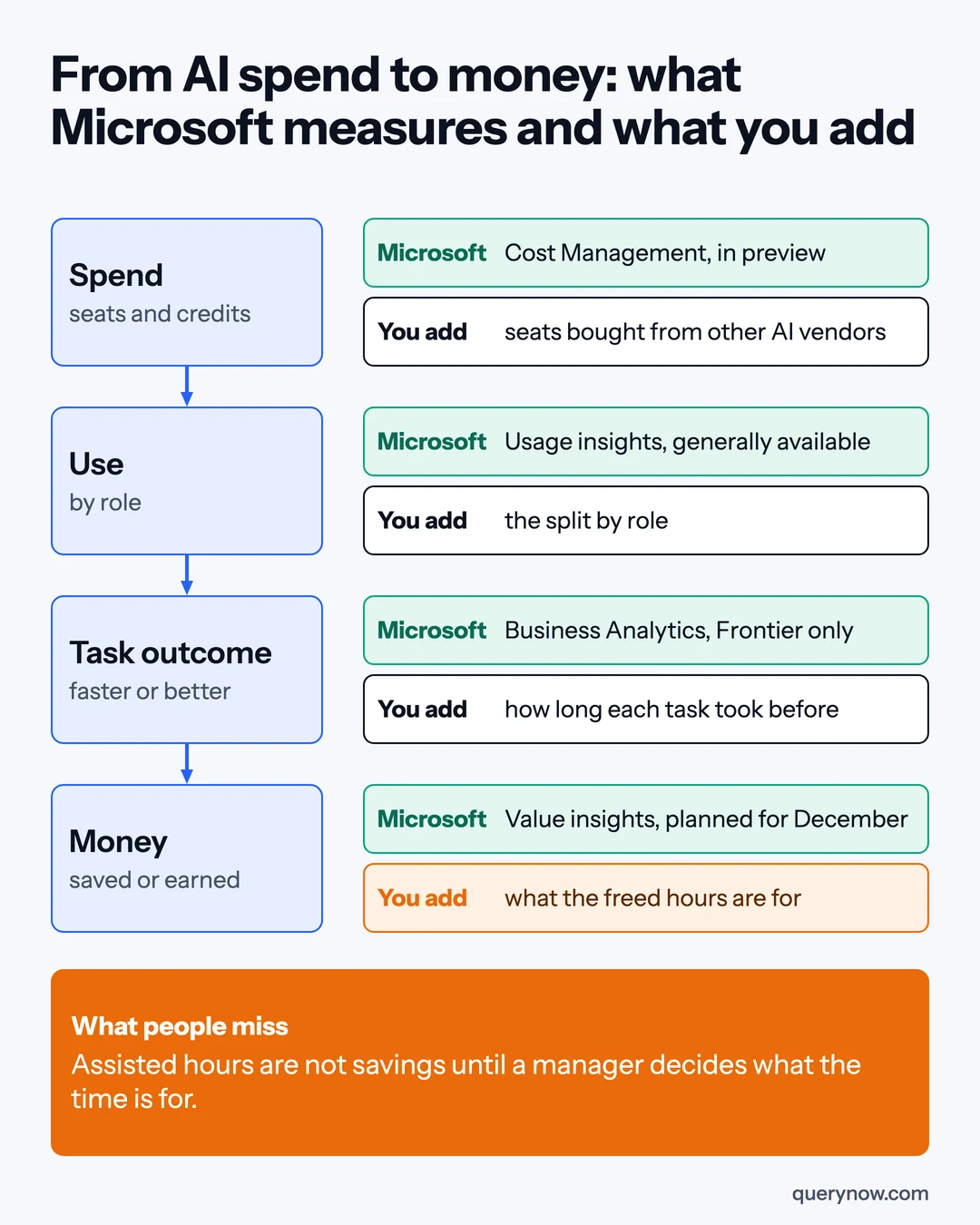
What Microsoft announced on 17 November
Four changes in the Ignite Book of News matter to a budget owner. Agent 365 usage and activity insights in the Microsoft admin center are generally available and no longer need an Agent 365 license on a qualifying Microsoft 365 subscription.
They cover Microsoft's agents and agents built on Microsoft platforms. The agent insights in Viva Insights still need at least 50 assigned Copilot licenses.
Cost data is in preview. Agent 365 Cost Management shows what drives spend on Microsoft's usage-based AI services. Agent 365 Business Analytics, which reports success rate, user satisfaction and assisted hours by use case, is rolling out to Frontier program customers. It needs at least one Microsoft 365 Copilot license in the tenant.
Value insights across Microsoft and other vendors' agents are planned for December. The fourth change is to billing. Copilot Credits now pay for the Today Feed, Windows 365 for Agents, and optionally Fabric, so more services can now be billed by consumption.
What these tools leave to you
The first gap is other vendors. Microsoft says its analytics will include connected services from other vendors if you hold an Agent 365 license. The pages I read do not say how seats bought directly from OpenAI, Anthropic, Cursor or Google get into those reports, so I would keep those invoices myself.
The second gap is the assisted hour. Microsoft's announcement pages do not say how it is calculated, and it turns into money only when a manager decides what the time is for and the result shows up: more cases closed or a contractor not renewed.
The third gap is the unit. A return for the whole tenant averages a team that uses Copilot all day with one that rarely opens it. Seats are granted and removed by role, so I would measure by role and by task.
The order I would do it in
1. Write the baseline
For three roles, list the three to five tasks you expect AI to change and how long each takes today, including correction time, plus the outcome and quality numbers the role already reports. Take the times from the ticketing system or a one-week sample. If Copilot is already rolled out, records from before the rollout are your best baseline. This step needs no Microsoft feature.
2. Turn on the usage data
Open the agent usage reports in the admin center, which are generally available. Check whether they group people by job role. If they do not, match the export to your HR role list.
3. Put seats and credits in one view
Build one table by role: Copilot seats, Agent 365 seats, Copilot Credits split by the product that billed them, and seats from other AI vendors. An agent shared by several roles gets its credits split by each role's share of sessions, an estimate to agree with finance. Cost Management is in preview, so use the invoice and the license export for now.
4. Pick outcome measures the business already tracks
Use a number the department head already reports, such as days to close the books or tickets resolved per agent, paired with a quality number such as reopened tickets. Business Analytics is rolling out to Frontier program customers only, so without it you collect this yourself.
5. Review at 30, 60 and 90 days
Re-time the baseline tasks, read the outcome and quality numbers next to usage, and set the rule before the first review. Low use at 60 days means training or a different task. High use with no change in the outcome at 90 days means the role keeps its seats only if realized benefit covers their cost. Microsoft's value insights are planned for December.
6. Cut what shows no use
Take a seat out of the renewal count when no usage report for that product shows activity. The generally available agent reports cover agent activity only, and reassigning a seat does not lower the bill. For credits, read billed consumption by product, because an agent can use credits when nobody opened anything.
Where the return actually comes from
Cost for one role is the seats, the credits its agents consumed, any other vendor's seats, and the cost of hours spent on setup, training, review and ongoing operation. As an example at Microsoft list price, a Microsoft 365 Copilot seat at $30 per user per month is $360 a year, and Agent 365 at $15 brings it to $540.
The benefit starts as capacity: hours saved per task against the baseline, times how often the task is done in a year, times what an hour of that role costs you. Capacity becomes a return when finance can see it, as avoided overtime, a contractor not renewed, or more output on the step 4 measure at the same quality. I would report capacity and realized benefit as separate lines, with finance signing off the second. The return is realized benefit minus cost, divided by cost, over the same period.
I would skip two things: surveys of time saved as a replacement for measured times, and buying licenses only to get a dashboard. The baseline needs no license, and usage data is included.
How I would check it was done
| Check | How to prove it |
|---|---|
| A baseline exists for each measured role | A dated sheet of tasks and times, from before the role got its seats |
| Usage is known by role | The usage report matched to the HR role list |
| All AI spend is in one view | Seats, credits by product and other vendors' invoices in one table that matches finance's total |
| The benefit is real | The outcome and quality numbers at 90 days against the baseline, with finance's sign-off on the realized line |
| Unused spend was removed | A lower renewal quantity or a lower credit charge on the invoice |
One caveat: Business Analytics is limited to the Frontier program, Cost Management is in preview, and value insights are planned for December. Without Frontier access, you measure from your own systems this quarter.
If your CFO asked what last quarter's assisted hours were spent on, who in your company could answer?
Where QueryNow fits
QueryNow is a Microsoft partner with teams in Texas and Munich. Our Copilot AI Foundation service sets up the baseline, the cost view and the 90-day reviews alongside the rollout.
Sources
- Microsoft, Ignite 2026 Book of News, 17 November 2026
- Microsoft Community Hub, What's new in Microsoft Agent 365: Ignite 2026, 17 November 2026
- Microsoft Copilot Blog, Copilot at Microsoft Ignite, 17 November 2026
- Windows IT Pro Blog, Windows 365 at Ignite 2026, 17 November 2026
- Microsoft, Microsoft Agent 365 product and pricing page, read 18 November 2026
QueryNow leads AI transformation for enterprises in the US and Europe. Founded in Germany in 2014, we build the foundation enterprise AI runs on, and the agents that run on it, for pharma, healthcare, manufacturing and financial services organizations on Azure and AWS.
FAQ
Frequently asked questions
What did Microsoft announce at Ignite 2026 for measuring Copilot and agent ROI?
Microsoft announced Agent 365 Business Analytics, which is rolling out to Frontier program customers, and Agent 365 Cost Management, which is in preview. Agent 365 usage insights became generally available without an Agent 365 license for customers on a qualifying Microsoft 365 subscription. Value insights across Microsoft and other vendors' agents are planned for December 2026.
Are assisted hours in Agent 365 Business Analytics the same as money saved?
No. Assisted hours are one of the value signals Agent 365 Business Analytics reports, and Microsoft's announcement pages do not explain how the figure is calculated. They become a saving or a gain only when a manager decides what the freed time is used for and the result shows up, such as more cases closed or a contractor not renewed.
Do Microsoft's tools measure spend on ChatGPT, Claude, Cursor or Gemini?
Microsoft says its analytics will include connected services from other vendors for customers with an Agent 365 license. The announcement pages do not explain how the cost of seats bought directly from those vendors reaches the reports. Until you see it in your own tenant, keep those invoices in your own cost view.
What should a company do first to prove Copilot ROI?
Take a baseline before rollout. For each role, write down the three to five tasks you expect AI to change and how long each takes today. A dashboard can show activity after rollout. It does not show how long the work took before, so use earlier system records if Copilot is already deployed.
The Monday digest
The three posts worth your time each week, one paragraph each. From the people building production AI.