
Contents 7 sections
If your developers use Claude Code or GitHub Copilot CLI, I would start by looking at what already runs on their laptops and block nothing until that list exists, unless it shows an attack in progress. I expect most companies to do it the other way round. Someone switches on the new Intune policy and developers lose access to mail and source code.
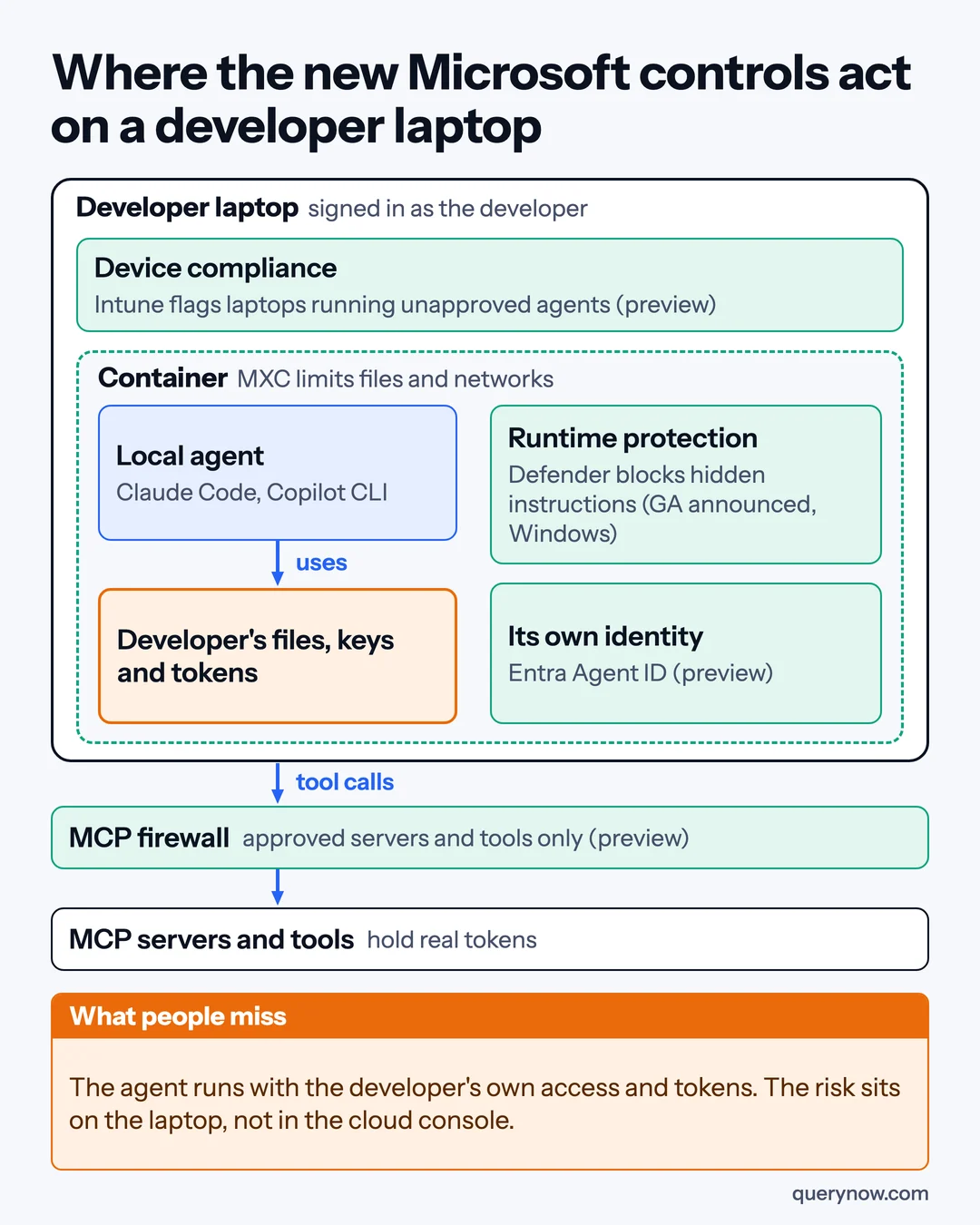
A coding agent runs on the laptop with the developer's own permissions, and the tool servers it calls (MCP servers) often hold real tokens for source control, tickets and databases. At Ignite on 17 November 2026 Microsoft added controls for several layers of that laptop. This article gives IT and security leads with developers on Microsoft 365 and Defender the order to turn them on and a way to measure the return.
The order I would do it in
1. See what already runs
Defender for Endpoint listed local agents before Ignite. With a Plan 2 license, onboarded Windows and macOS devices that meet the version and antivirus prerequisites need no extra setup for local agent discovery. The inventory shows each agent, the person and device, its configured MCP servers, and whether it approves its own actions without asking.
Read that column first. Microsoft says an entry is not proof of use, and the support matrix shows MCP details for only some agents. Discovery is generally available on Windows and macOS, with Windows Subsystem for Linux and VS Code extensions on macOS in preview.
2. Agree an allow list with the developers
Take the inventory to engineering leads and agree which agents and MCP servers are approved, and who decides exceptions. Steps 4 and 6 enforce this list. Also ask which agents run with administrator rights. Windows administrator protection, now generally available, grants admin rights one task at a time.
3. Turn on runtime protection in audit mode
Defender can now inspect what enters and leaves the agent, to catch an instruction hidden in a web page, a repository or a tool result. Microsoft recommends starting in audit mode, which only records. I would move to block mode once approved workflows run clean in audit and the false alarms are resolved.
The Book of News says this is generally available on Windows for Claude Code, GitHub Copilot CLI and four related apps, with Plan 2. Microsoft's pages differ here. The Learn page still carried a preview label on 18 November, with a known issue where Claude Code can keep processing after a reported block. The support matrix lists Windows only, so a developer's Mac is discovered but gets no runtime protection from Defender.
4. Pilot the compliance policy before it reaches everyone
Intune's new software compliance policy, in public preview for Windows, marks a device that runs a listed agent as noncompliant, and Conditional Access can then block it. Microsoft's screenshot shows apps identified by MSI product codes, and many command-line agents are installed another way. Test that the policy sees yours.
If a new Conditional Access rule will act on the result, put it in report-only mode and read the sign-in logs. If you already enforce a compliant device rule, the policy acts as soon as it is assigned. Assign it to a small pilot group and widen it when nobody on the allow list gets blocked.
5. Give each agent its own identity
A local agent signs in as the developer, so the record cannot separate the two. Microsoft Entra will give each discovered local agent a separate identity, an Entra Agent ID, starting with these two, and Conditional Access can then tell person from agent. Agent ID for local agents and that Conditional Access option are both in preview, so I would use them first to get sign-in records that name the agent.
6. Containers and the MCP firewall last
Microsoft Execution Containers (MXC) set which files and networks a supported agent can reach, so check that yours is supported. The Windows blog says MXC has been generally available on Windows 11 since October, with learning mode now generally available and process container improvements in preview. The Entra MCP firewall, in preview, limits agents to approved MCP servers and tools. Enforce a container only after learning mode has covered a release cycle and the build still passes.
What breaks a developer's day in the wrong order
Compliance before an allow list can lock out developers doing useful work, and some may move it to a personal machine. A container enforced before learning mode stops the build when the agent needs a registry nobody listed. Agree in step 2 what triggers a rollback.
Where the return comes from
The gain is the time coding agents save your developers. That number comes from your own teams, never from a vendor, and this pilot does not prove it. The pilot shows what the controls cost and whether they slow delivery.
Before step 3, record two things for the pilot teams: time from opening a pull request to merging it, and help desk tickets about developer tools. Compare them after enforcement, next to the hours and licenses the controls cost. Expand if merge time holds and tickets do not rise.
From the Defender inventory, also record how many agents and MCP servers exist, how many are approved, and how many approve their own actions. Each month, approved use should hold steady and unapproved agents should fall. If both fall, ask whether work has moved off managed devices. For time to detect, run Microsoft's demonstration test and time the alert's path to a person.
Skip new licensing at first. Discovery needs only Plan 2, which Microsoft 365 E5 includes, and the risk levels on top need Microsoft 365 E7 or Agent 365.
How I would check it was done
| Check | How to prove it |
|---|---|
| You know what runs | An inventory export with each discovered MCP server marked approved or not |
| The allow list is agreed | A dated list signed by engineering and security |
| Runtime protection detects and blocks | The mode confirmed on the device, and Microsoft's demonstration test alerted and blocked |
| Compliance will not surprise anyone | Report-only results, or a pilot in which nobody on the allow list was blocked |
| Agent and human activity are separate | A sign-in record that names the agent's identity for a pilot user |
One caveat. Most of this is Windows first, steps 4 to 6 lean on previews that can change, and native Linux workstations are not in Defender's support matrix. These controls also do not replace the permissions and audit logs in your cloud accounts.
If you opened the Defender inventory today, how many coding agents would you find that nobody approved?
Where QueryNow fits
QueryNow is a Microsoft partner with teams in Texas and Munich. Our AI agent security audit takes the inventory, the allow list and the checks above and runs them on the agents your developers already use.
Sources
- Microsoft, Ignite 2026 Book of News, 17 November 2026
- Microsoft Learn, Local AI agent discovery with Microsoft Defender for Endpoint, updated 3 November 2026
- Microsoft Learn, Discover local AI agents with Microsoft Defender for Endpoint, updated 3 November 2026
- Microsoft Learn, AI agent runtime protection with Microsoft Defender for Endpoint (Preview), updated 17 November 2026
- Microsoft Learn, Microsoft Defender for Endpoint AI agent support matrix, updated 13 November 2026
- Microsoft Intune Blog, What's new in Microsoft Intune at Ignite, 17 November 2026
- Microsoft Entra Blog, AI is changing access. See how Microsoft Entra helps you stay ahead, 17 November 2026
- Windows Experience Blog, Microsoft Ignite 2026: Building Windows for the next era of work, 17 November 2026
- Microsoft Learn, Conditional Access report-only mode, 1 June 2026
QueryNow leads AI transformation for enterprises in the US and Europe. Founded in Germany in 2014, we build the foundation enterprise AI runs on, and the agents that run on it, for pharma, healthcare, manufacturing and financial services organizations on Azure and AWS.
FAQ
Frequently asked questions
Can Microsoft Defender see Claude Code and GitHub Copilot CLI on our laptops?
Yes. Defender for Endpoint discovers local AI agents and, for many of them, their configured MCP servers on onboarded Windows and macOS devices that meet the Defender version and antivirus prerequisites. It needs a Defender for Endpoint Plan 2 license, which Microsoft 365 E5 includes. Microsoft says an inventory entry is not proof that the agent was used.
Is Defender runtime protection for local AI agents generally available?
Microsoft's Ignite 2026 Book of News says it is generally available on Windows for Claude Code, GitHub Copilot CLI and four related apps, for Defender for Endpoint Plan 2 customers. The Microsoft Learn page still carried a preview label and known issues on 18 November 2026, so confirm the status in your own tenant. The support matrix lists it for Windows only.
Will the Intune policy block developers who use an unapproved agent?
It can. The Intune software compliance policy, in public preview for Windows, marks a device running a listed agent as noncompliant, and Conditional Access can then block that device from company resources. If you already enforce a compliant device rule, the policy acts as soon as it is assigned, so agree an allow list with developers and assign it to a small pilot group first. Report-only mode shows what one Conditional Access rule would do, and it does not switch off other rules that already enforce.
How do we measure the return on securing coding agents?
Before you start, record what you already track for the pilot teams, such as pull request time to merge and help desk tickets about developer tools, plus the Defender inventory counts of agents, MCP servers and unapproved agents. Compare the same numbers after enforcement, next to the hours and licenses the controls cost. This shows what the controls cost and whether they slow delivery. The productivity gain from the agents themselves is a separate number that only your own teams can give you.
The Monday digest
The three posts worth your time each week, one paragraph each. From the people building production AI.