
Contents 7 sections
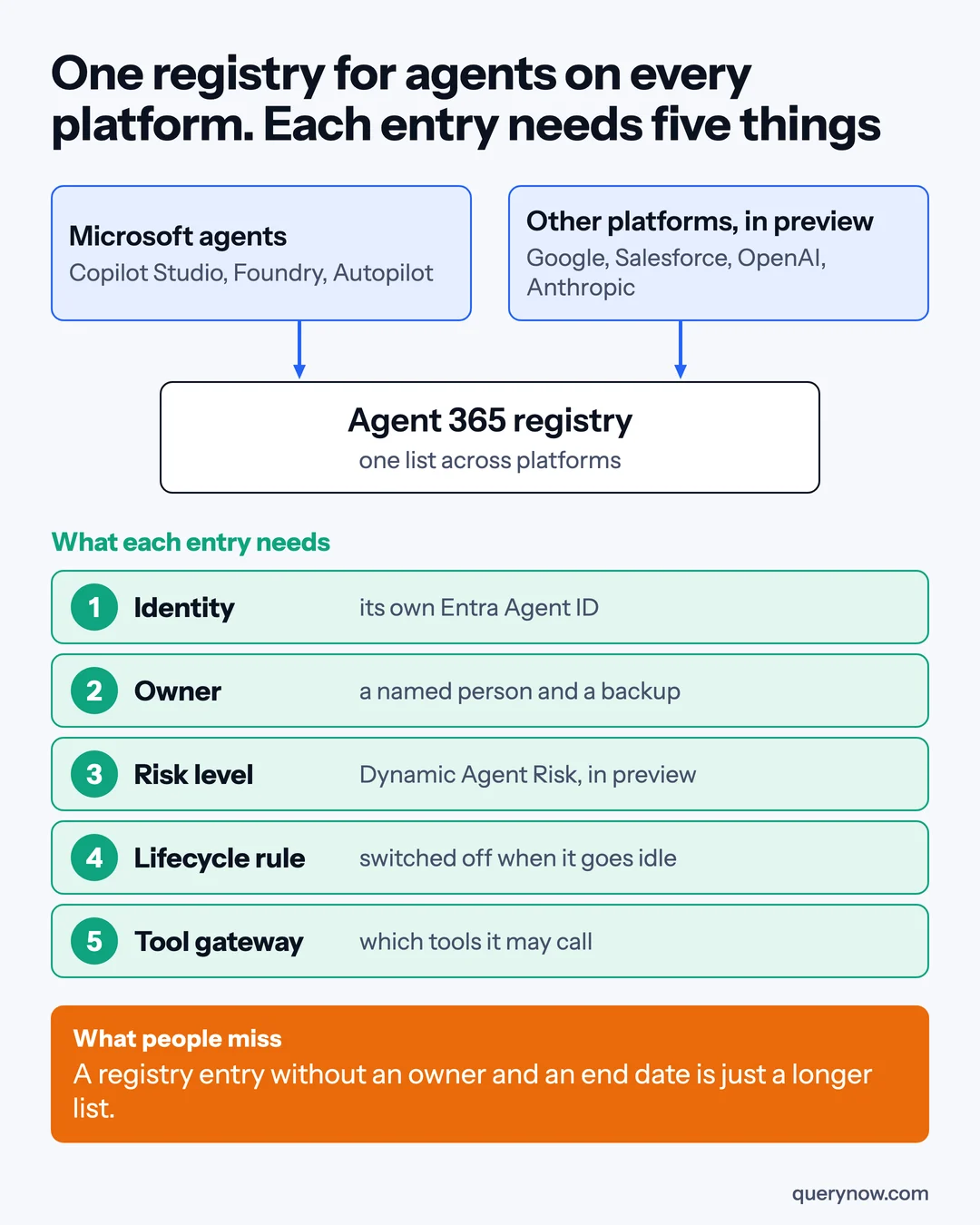
Most companies will connect their other agent platforms to Microsoft Agent 365, see one long list, and call their agents governed. I would count an agent as governed only when its entry has a named owner and a rule that switches it off when it goes idle.
At Ignite on 17 November 2026, Microsoft said agents built on other platforms, including Google's agent platform, Salesforce Agentforce, OpenAI and Anthropic's Claude Managed Agents, will appear in the Agent 365 registry. Each gets a separate identity in your directory, which Microsoft calls an Entra Agent ID. This is in preview, and Microsoft says the rollout will complete in December. This article is for IT, security and finance leads whose company runs agents in more than one place.
What you get before you buy anything
Microsoft's Agent 365 service description, dated 30 September 2026, lists the registry and the basic actions on an agent (block, delete, reassign the owner) as included in Microsoft 365 Enterprise, Business, Education and frontline plans. Tenant-wide control of tools, full insights for agents from other platforms and the Defender and Purview protections need Agent 365 or Microsoft 365 E7.
List prices are $15 per user per month for Agent 365 and $99 for E7, paid yearly. Microsoft recommends a licence for everyone who interacts with, owns, manages or sponsors a managed agent, so the bill follows the people around your agents. Microsoft's pages differ on whether syncing agents from other platforms is included. Ask in writing whether registry sync is covered by your plan, and which users need a licence.
The order I would do it in
1. Take a baseline from the usage insights
Usage insights are generally available, and Microsoft says they no longer depend on an Agent 365 licence. They show active users, sessions, exception rate and run time, for Microsoft's own agents and agents built on Microsoft platforms only. For agents elsewhere, pull usage and the last three invoices from each platform's own console. Date it all and mark an agent with no data as unknown, which is different from idle.
2. Connect the platforms, starting with the one that touches the most data
Connected platforms are in preview. The connection is read-only, and an administrator on the other platform has to create the credentials. Microsoft's setup page, dated 5 November, says sync runs only when someone starts it, and that an agent deleted on the other platform may stay in the registry. Name one person to run the sync before each review.
3. Give every agent an owner
The registry shows who owns each agent, and reassigning an owner is one of the included basic actions. I would check every synced agent by hand, since the owner on record may have left the company. Record a person, a backup and a review date. An action center that lists ownerless and inactive agents is expected in private preview in December, and I would not wait for it.
4. Turn on lifecycle policies
Microsoft's Entra post from Ignite calls agent lifecycle policies generally available, and they check that each agent has a human sponsor and recent activity. The Learn page from October differs on two points. It still carries a preview label, and it says owners are notified at 60 inactive days and the identity is disabled at 90, where the Ignite post says disabled at 60. It also says the default policy needs no licence, and custom policies do.
Before you switch it on, exclude the agents that run once a quarter, which the default policy allows. For an agent on another platform, test what disabling its Entra identity actually stops. The connection to that platform is read-only, so the agent may have to be turned off there too.
5. Use Dynamic Agent Risk to decide what to look at next
Dynamic Agent Risk, in preview, gives each agent one risk level that shows in the admin center, Defender, Entra and Purview. I would use it to choose which agents get a full access review first, and I would not tie automatic blocking to a preview score.
6. Govern the tools
Plugins and skills governance is generally available: an admin decides which plugins and skills exist in Microsoft 365 Copilot and Copilot Cowork, and for which groups. Governance of the servers that expose tools to agents (MCP servers) behind Azure AI Gateway and LiteLLM is in preview. It shows which agents depend on a server before you block it. If a managed service provider runs your tenant, ask what they can change on your agents through multi-tenant agent management, in public preview for partners.
Where the return comes from
I would count three things. The first is retired agents, where I would count only invoice lines that go down after an agent is switched off: a seat removed, a platform fee cancelled, Copilot Credits no longer consumed. Report removed data access separately, since it has no price, and subtract the licences and admin time this work costs.
The second is how fast you can reach an owner. Before you start, pick five agents at random and time how long it takes to find a person who can say whether each can be switched off. Repeat after step 3. The third is duplicate builds: log each funded request that was closed by reusing an existing agent, and value it at the approved budget minus the cost of the reuse.
What I would skip is buying licences for the whole company on day one. Price the paid features for the users who work with the agents that need them.
How I would check it was done
| Check | How to prove it |
|---|---|
| A baseline exists | Dated usage exports and invoices for every platform, with unknowns marked |
| The list was current at review | A sync timestamp for each connected platform, taken just before the review |
| Every agent has an owner | No empty owner field, every owner an active employee, and a sample who confirm it |
| Stale agents really stop | One test agent per platform left idle, disabled by policy, and shown to no longer run |
| Tools are approved, not open | Plugin and skill assignments by group, and one unapproved plugin a test user cannot add |
One caveat. Connected platforms, Dynamic Agent Risk and the MCP gateway support are previews, and Microsoft's Ignite post describes connections without stored secrets that the 5 November setup page does not show. Check what your own tenant offers. A registry also does nothing for agents that never get connected, such as tools on a developer's laptop.
If one of your agents on another platform misbehaved tonight, how long would it take to find the person who can turn it off?
Where QueryNow fits
Our AI agent security audit builds the inventory, the owner list and the lifecycle rules above for the agents you already run.
Sources
- Microsoft Tech Community, What's new in Microsoft Agent 365: Ignite 2026, 17 November 2026
- Microsoft, Ignite 2026 Book of News, 17 November 2026
- Microsoft Tech Community, AI is changing access: see how Microsoft Entra helps you stay ahead, 17 November 2026
- Microsoft Learn, Microsoft Agent 365 service description, 30 September 2026
- Microsoft Learn, Connected platforms in Microsoft Agent 365, 5 November 2026
- Microsoft Learn, Microsoft Entra Agent ID default inactivity policy, 13 October 2026
- Microsoft Learn, Microsoft Agent 365 overview, 11 November 2026
- Microsoft, Microsoft Agent 365 plans and pricing, read 18 November 2026
- Microsoft Licensing, Microsoft Agent 365 licensing FAQ, read 18 November 2026
QueryNow leads AI transformation for enterprises in the US and Europe. Founded in Germany in 2014, we build the foundation enterprise AI runs on, and the agents that run on it, for pharma, healthcare, manufacturing and financial services organizations on Azure and AWS.
FAQ
Frequently asked questions
Which third-party agents can appear in the Agent 365 registry?
At Ignite on 17 November 2026, Microsoft named Salesforce Agentforce, Google Vertex AI, Databricks, Snowflake, Anthropic's Claude Managed Agents and OpenAI among the platforms whose agents enter the registry with an Entra Agent ID. Connected platforms are in preview, capabilities vary by platform, and Microsoft says the rollout across platforms will complete in December.
Do I need an Agent 365 licence to see how my agents are used?
Usage insights for Microsoft's own agents and agents built on Microsoft platforms are generally available and no longer depend on an Agent 365 licence. Full insights for agents from other platforms, along with the advanced security and governance features, still need Agent 365 or Microsoft 365 E7. The list prices are $15 and $99 per user per month, paid yearly.
What do agent lifecycle policies in Microsoft Entra do?
They check that each agent has a human sponsor, is still needed and has been active recently. If an agent fails, Entra notifies its owners and sponsors and then disables or deletes it according to the policy. Microsoft's Ignite post calls them generally available while a Learn page still labels them preview, and the two differ on whether an idle agent is disabled at 60 or 90 days, so exclude agents that run once a quarter before you turn it on.
How do you measure the return on an agent registry?
Count three things against a baseline taken before you start. Count the invoice lines that went down after idle agents were retired, the time it takes to reach an owner who can switch an agent off, and the funded build requests that were closed by reusing an agent that already existed. Subtract the licences and admin time the work cost.
The Monday digest
The three posts worth your time each week, one paragraph each. From the people building production AI.