Contents 5 sections
If I had to secure AI on Microsoft Azure this quarter, I would turn off API keys before I did anything else. Most of the later controls only work when you know which application or agent is calling the model, and a shared key cannot tell its users apart.
Azure has most of the parts for a zero trust design, which means no caller is trusted because of where it sits and every request has to prove who is asking. What the documentation does not give you is the order to build in, or the places where a setting does less than its name suggests. This is the order I would use, with the things I would check along the way.
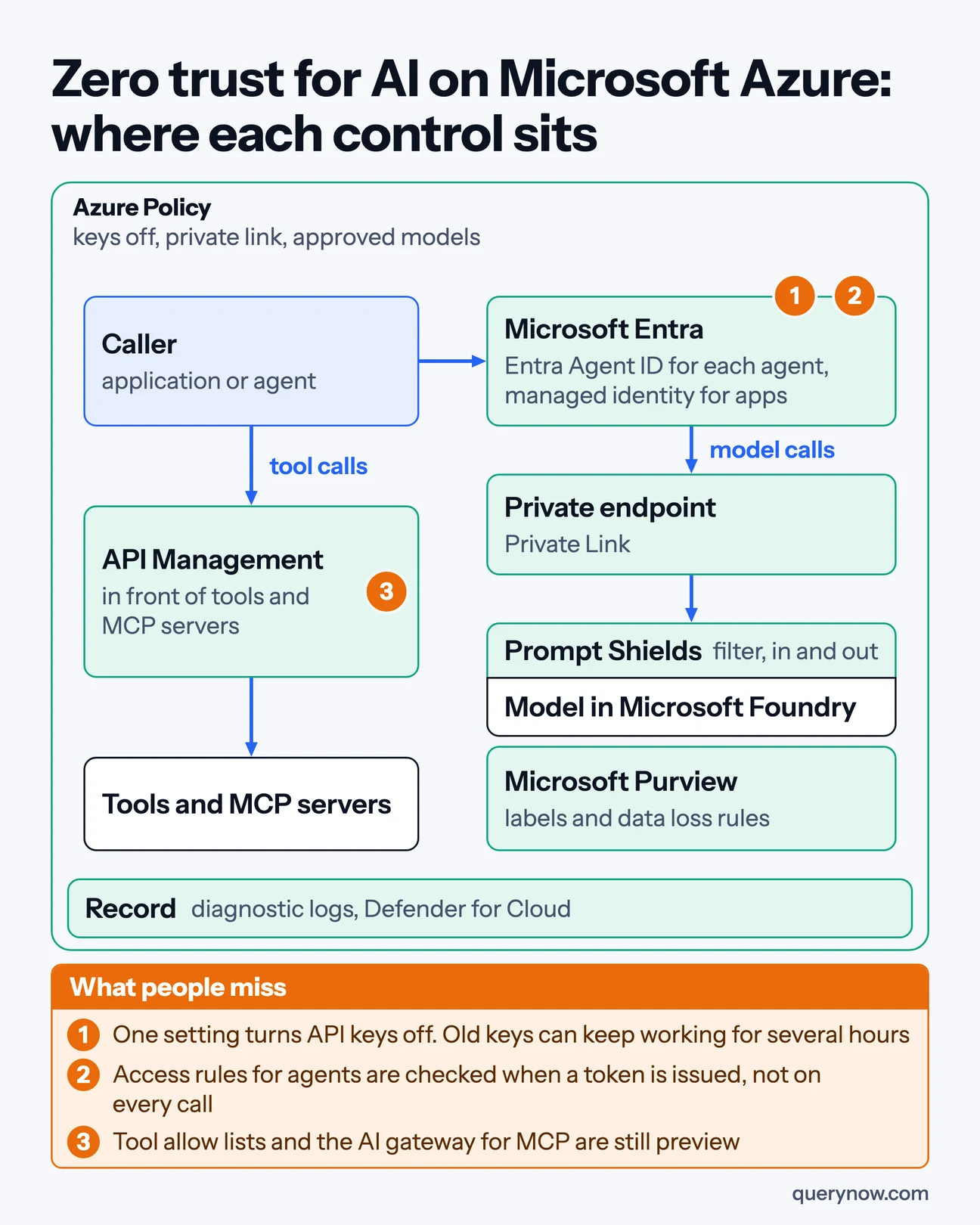
The order I would build it in
1. An identity for every agent
Microsoft Entra Agent ID gives each agent its own account in your directory, so its access can be reviewed and removed like a person's. In Microsoft Foundry a new agent gets its own identity and starts with no permissions. Agents created the older way share one identity for the whole project, so I would find those first and move them, because a shared identity has the same problem as a shared key.
2. Keys off
One setting turns keys off on a resource, and a built-in Azure Policy can refuse any resource that leaves them on. Microsoft warns that old keys can keep working for up to several hours after the switch. So do this as planned work, and do not count on it in the middle of an incident.
3. Access rules for agents
Conditional Access now covers agents, with two limits that matter. The rule is checked when the agent receives its sign-in token, and it is not checked again on each call. It also does not reach an agent that still signs in with a key, which is one more reason for step 2. Microsoft's own pages disagree on whether this feature is still in preview, so confirm it for your tenant before you rely on it.
4. A private path to the model
Set public network access to disabled and add a private endpoint. Then write down what still leaves the private network, because some of it does. Microsoft documents that tools which fetch content for an answer, such as web search and SharePoint grounding, still use public endpoints.
5. Tools, where most of the risk now sits
This is the least finished part. The policies that allow only approved tools, and the gateway for tool traffic, were both in preview on 17 November 2026. The piece without a preview label is Azure API Management in front of a tool server, where it checks each caller's Entra token. Its policies cover all the tools on a server at once, so put tools that need different rules on different servers.
One detail is easy to miss. Foundry can mark a tool as needing approval, and Microsoft says enforcing that is the job of the agent's own runtime. So for any action that cannot be undone, I would build the approval step myself and test that it holds.
6. What goes in, what comes out, and which data
Prompt Shields looks for instructions hidden in what the model reads. Detection of attacks typed by the user is on by default. Detection of attacks hidden in documents is off by default, and an agent meets those in the documents it reads, so turn it on. For data, Microsoft Purview applies your sensitivity labels to AI calls only when the call carries the user's identity. An application that calls the model as itself may get no label protection at all.
7. The record
Send diagnostic logs for every model deployment to your log store. API Management offers opt-in logging of prompts and answers, and the standard diagnostic logs do not say whether the prompt text is included. Decide early what an investigation would need. Defender for Cloud has threat detection for AI workloads, and Microsoft says it does not scan images or audio.
How I would check it was done
| Check | What proves it |
|---|---|
| No application calls a model with a key | The deny policy in force, and a test call with an old key that is refused the next day |
| Every agent signs in as itself | The agent list matched to Entra, with no agent on a shared project identity |
| The model cannot be reached from the internet | A refused call from outside, and a written list of the tools that still go out |
| Risky actions wait for a person | A test where the agent tries the action and is stopped |
| Document attacks are inspected | The Prompt Shields setting, and one blocked test document |
Two cautions. Several of these features are still in preview and will change, and Microsoft Ignite opened on the day I read the documentation, so check the status of each one before you commit a design to it. If you run Claude through Foundry, check which of its two hosting options you bought, because one of them can process data outside Azure.
How many of your AI applications on Azure still sign in with a key?
The same build on other clouds is in the articles on AWS and Google Cloud.
Where QueryNow fits
QueryNow is a Microsoft partner with teams in Texas and Munich. Our AI agent security audit checks the points above on the agents you already run, and the full checklist is in the white paper Zero trust architecture for AI.
Sources
- Microsoft Learn, Agent identity concepts in Microsoft Foundry, 28 October 2026
- Microsoft Learn, Disable local authentication, 31 May 2026
- Microsoft Learn, Conditional Access for agents, 31 July 2026
- Microsoft Learn, Network isolation for Microsoft Foundry, 29 September 2026
- Microsoft Learn, MCP servers in Azure API Management, 11 September 2026
- Microsoft Learn, Toolbox in Microsoft Foundry, 26 October 2026
- Microsoft Learn, Prompt Shields, 28 August 2026
- Microsoft Learn, Microsoft Purview for Microsoft Foundry, 1 May 2026
- Microsoft Learn, AI threat protection in Defender for Cloud, 19 May 2026
QueryNow leads AI transformation for enterprises in the US and Europe. Founded in Germany in 2014, we build the foundation enterprise AI runs on, and the agents that run on it, for pharma, healthcare, manufacturing and financial services organizations on Azure and AWS.
FAQ
Frequently asked questions
What does zero trust for AI mean on Microsoft Azure?
It means no model call or agent action is trusted because of where it comes from. On Azure that comes down to an identity for each agent and application, API keys turned off, a private path to the model, control of tools, inspection of prompts and output, data labels, and a record of every call.
Can you turn off API keys for Azure AI model endpoints?
Yes. The disableLocalAuth setting turns key access off on a resource, and a built-in Azure Policy can audit or deny resources that leave key access on. Microsoft's page on disabling local authentication, updated 31 May 2026, says old keys can keep being accepted for up to several hours after the change, so the cutoff is not immediate.
Does Conditional Access apply to AI agents?
Microsoft Entra has Conditional Access for agents. Its page, updated 31 July 2026, says policy is evaluated when Entra issues or refreshes a token, which is the pass an agent presents with each call, and that it does not reach an agent that uses an API key. That page carries no preview label, while another Entra page, updated 18 May 2026, links to the feature as a preview.
Which Azure controls for agent tools and MCP servers are still preview?
On 17 November 2026 Microsoft's documentation labelled these as preview: the Azure Policy definitions for approved and denied tools, AI gateway governance for MCP tools in Foundry, agent guardrails, and scanning of tool responses in Prompt Shields. MCP stands for Model Context Protocol, a standard for connecting agents to outside services. MCP support in Azure API Management carried no preview label, and its policies apply to all tools on an MCP server at once.
Do the same Azure controls apply to Claude models in Microsoft Foundry?
Only in part. Microsoft documents two hosting options for Claude. In the option hosted on Azure, prompts and outputs stay in Azure. In the option hosted on Anthropic infrastructure, data may be processed outside Azure. Foundry's guardrail system is scoped to models sold by Azure, and the Claude deployment page, updated 21 September 2026, does not document Defender AI threat protection or Purview for Claude.
The Monday digest
The three posts worth your time each week, one paragraph each. From the people building production AI.